


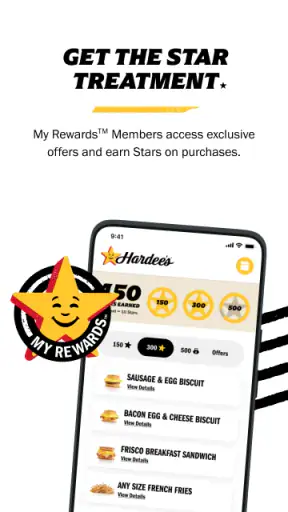
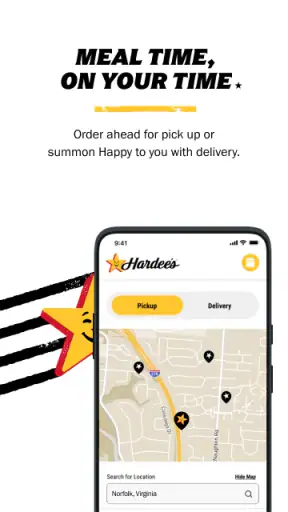
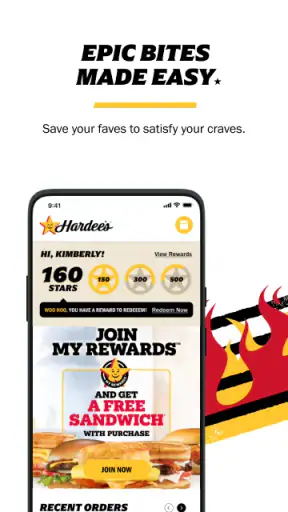

If you are standing outside a Hardee’s and want to order without joining the line, Hardee’s® is the app I would try first. It is a free Food & Drink app from CKE Restaurants built around mobile ordering, with choices covering burgers, chicken, breakfast, and desserts. I found its appeal less about discovering something new and more about making a familiar Hardee’s visit easier to plan.
The most useful way to approach it is as a practical ordering tool rather than a full restaurant companion. You open it when you already know you want Hardee’s, choose a location, build the meal, and review the order before heading out. That focused purpose is also its main limitation: if you are comparing several restaurants or looking for broad food-delivery options, a general delivery service may be more convenient.
What to expect before your first order
The app has a straightforward promise, but the experience depends heavily on the restaurant you select and the kind of visit you are planning. For a quick breakfast pickup, a burger run after work, or a family order where everyone wants something different, keeping the menu in one place is helpful. I especially like the idea of deciding what I want before reaching the counter, because it gives me time to check the meal details instead of making choices while people are waiting behind me.
Hardee’s® is rated at 4.6 on average from around 25 thousand ratings, and it has passed one million installs. Those figures suggest that it has become a familiar option for people who regularly order from the chain, although popularity should not be confused with universal convenience. The app works best when a nearby Hardee’s is already part of your routine.
The store classifies it for Everyone, and the app is free to install. Its current release is version 5.6.0, while the minimum operating system is Android 10. If your phone is older than that requirement, checking compatibility before planning a meal will save you an unnecessary installation attempt. On a supported device, the basic idea is easy to understand even if you have never used a restaurant-ordering app before.
I would not install it expecting a restaurant map, a broad dining guide, or a substitute for every possible ordering method. Its value is narrower and more useful: it places Hardee’s menu choices and mobile ordering in front of you. That makes it a good fit for repeat customers, people who dislike ordering aloud, and anyone who wants to organize a group order at their own pace.
How it fits into an ordinary day
Imagine leaving work with a short break before heading home. Instead of arriving at the restaurant and deciding between breakfast items, burgers, chicken, and desserts at the counter, you can make the selection while still on the way. I would use that time to settle the main order, check whether the meal includes what I expect, and confirm the chosen location before leaving.
For a family meal, the benefit is even clearer. One person can review the menu while asking others what they want, then check the complete basket as a single order. That reduces the chance of forgetting a side or dessert, but it also creates a trade-off: a large order deserves a careful final review because correcting an item after submission may be less convenient than changing your mind at the counter.
Breakfast users should pay attention to the selected restaurant and the timing of the visit. A breakfast craving is often more time-sensitive than a casual lunch order, so I would avoid assuming that every location offers the same practical experience at every hour. The safest workflow is to select the restaurant early, inspect the available menu, and only then build the order.
Setting it up without getting lost
After installing the app, I would begin by treating the restaurant selection as the important first decision. Do not rush directly into choosing food if the app first needs to know where you plan to order. A nearby location may be obvious, but checking it deliberately is worthwhile when you are traveling, ordering for someone else, or choosing between restaurants in the same area.
Once the location is clear, browse by the type of food you want rather than scrolling aimlessly. The broad menu range is useful because the same app can handle a morning order, a burger lunch, a chicken meal, or a dessert stop. I find category-based browsing less tiring than trying to remember the entire menu, especially when ordering for several people with different preferences.
My first setup tip is to build the order in a calm moment, not while walking into a crowded restaurant. Restaurant apps are most helpful when they move decisions away from the busiest part of the visit. If you are ordering for a group, ask everyone for their choices first and then add them one by one. This makes the final basket easier to audit than a rushed sequence of additions.
A second useful habit is to pause after adding each important item. Look at the item name, the meal structure, and any available choices before moving on. This is particularly valuable when you are ordering a combination of main food, sides, drinks, and dessert. The app can organize the order, but it cannot know whether your group intended to share a side or whether one person wanted a separate meal.
The developer shown for the app is CKE Restaurants, which makes the focused Hardee’s connection clear. That focus is reassuring for someone who already knows the chain, but it also means the app is not designed to help you compare Hardee’s with another burger restaurant. If your priority is finding the cheapest option across multiple brands, use a broader service instead.
Getting to the first meaningful success
For a first attempt, I recommend starting with a small order for yourself. Choose one familiar main item, add only the side or drink you actually want, and review the basket before submitting. This is a better test than beginning with a complicated family order because it lets you learn the flow without having to untangle several choices at once.
The first successful action is not simply opening the menu; it is completing an order that matches what you intended to buy. To get there, select the restaurant, choose the food category, add the item, inspect the basket, and confirm the order details. I would take a screenshot or note of the confirmation screen only if I needed a personal reminder, but I would not assume that a basket is the same thing as a submitted order.
That distinction matters. Many ordering mistakes happen when someone adds food and then leaves the app, believing the restaurant has received the request. I treat the final review and confirmation as separate steps. Before finishing, I check the selected location, the number of meals, the included sides, and any dessert or drink added for someone else.
If you are collecting food on the way to a meeting or event, give yourself a little breathing room instead of planning to arrive at the exact minute you expect the order to be ready. The app simplifies ordering, but it does not remove the real-world variables of traffic, restaurant workload, or a busy pickup area. Mobile ordering is a convenience, not a guarantee that every visit will take the same amount of time.
One non-obvious advantage is the reduced pressure during customization. At a counter, I may forget what I wanted because I am trying to speak quickly. On a phone, I can read each choice and reconsider it before completing the basket. The downside is that the screen can make a large order feel deceptively simple; the more items you add, the more important the final check becomes.
Where new users may hesitate
The first common confusion is knowing whether the app is being used for browsing or for an actual pickup order. Those are different intentions. If you only want to see what Hardee’s offers, browsing is low commitment. If you need food at a particular time, location selection and the final order review deserve much more attention.
Another point of friction is assuming that the app will behave like a general delivery marketplace. Hardee’s® is centered on the chain’s own ordering experience, while delivery platforms typically combine restaurants, delivery logistics, and comparison tools. I would choose this app when I am already committed to Hardee’s and want a direct route to the menu. I would choose a delivery marketplace when convenience means having food brought from different restaurants or comparing several nearby choices.
New users may also wonder whether the app is worthwhile for someone who already knows the menu. In my view, yes, but only for certain visits. If you are ordering one simple item and the counter is empty, the app may add an unnecessary step. If you are ordering several meals, dislike repeating an order aloud, or want to review breakfast and dessert choices privately, it becomes more useful.
A third practical insight is to use the app as a planning screen before using it as a speed tool. Read the menu, decide what the group wants, and remove anything that was added accidentally. The fastest order is usually the one that was prepared thoughtfully, not the one submitted with the fewest taps.
There is also a human factor. Someone ordering for a child, an older relative, or a colleague may need to verify every item rather than relying on memory. A familiar brand name can create overconfidence, especially when two meals look similar. I would read the complete order once from top to bottom before committing, particularly when the order contains different food categories.
Using it beyond the first order
After the first successful order, the app becomes more valuable when it fits a repeat routine. You might use it for a weekly breakfast stop, a planned burger lunch, or a predictable family dinner. The key is not to treat every visit as identical. Check the selected restaurant and the current menu each time, especially when you are traveling or ordering at a different location.
For repeat use, I would create a simple personal checklist: location first, main items second, sides and drinks third, dessert last, then a complete basket review. This order mirrors how I think about a meal and makes omissions easier to spot. It also prevents dessert from becoming an afterthought when someone specifically asked for it.
Group ordering is where the app can save the most mental effort, but it is also where discipline matters most. I suggest adding each person’s meal as a separate mental block, checking it immediately, and only then moving to the next person. If two people want similar burgers or chicken choices, verify the quantities rather than trusting a quick visual scan.
Another trade-off concerns flexibility. The app gives you a clear digital record of what you intended to order, which is useful when you are coordinating food for others. However, a face-to-face order may feel easier when your request is unusual or when you need immediate clarification. For a straightforward menu choice, the app wins on quiet review; for a complicated conversation, a staff member may be more helpful.
The app is also a reasonable option for people who prefer not to make phone calls. You can inspect the available choices yourself and avoid repeating a long order verbally. That said, visual ordering does not eliminate responsibility. If an item, side, or drink matters to you, confirm that it appears in the final basket rather than assuming it was included automatically.
Who should use it, and who should skip it?
I would recommend Hardee’s® to regular customers, busy commuters, families placing several items, and anyone who prefers to make food decisions privately. It is especially sensible when you already know the restaurant you want and your order can be described using the app’s menu choices without much explanation.
I would be less enthusiastic for someone who rarely visits Hardee’s, wants to compare many restaurants, or expects a universal delivery experience. In those cases, a general food app may offer a wider range of restaurants and a more suitable comparison process. The dedicated app is strongest when brand loyalty is already part of the decision.
It may also be unnecessary for a very quick, uncomplicated visit where there is no line and you are comfortable ordering at the counter. Installing an app for a single spontaneous snack is not automatically better than walking in. The benefit grows with planning, repeat visits, group orders, and the need to review choices carefully.
People using an older phone should check the operating-system requirement before depending on it for a meal. For supported devices, the free price removes the main barrier to trying it, but the real question is whether mobile ordering matches your habits. I would test it with a small order first rather than making it responsible for an important event immediately.
My recommendation after using the complete workflow
Hardee’s® succeeds because it keeps its purpose clear: it helps you arrange a Hardee’s order from your phone. I appreciate that focus when I already want a burger, chicken, breakfast, or dessert from the chain. The app is most convincing when it turns a rushed counter decision into a calm sequence of menu selection and basket review.
Its limitations are equally clear. It is not the best tool for restaurant comparison, and it does not make real-world pickup conditions predictable. A large order still needs human attention, and a simple order may be faster at the counter. Those are not reasons to avoid it; they are reasons to use it in the situation it handles well.
My advice to a first-time user is simple: install it before you are hungry, select the intended restaurant carefully, begin with a familiar order, and treat the final basket as a checklist. Once that first order matches what you meant to buy, you can decide whether the app deserves a regular place in your routine.
For me, the strongest reason to keep it is control. I can take a moment to organize a meal, check the details, and avoid the pressure of making every decision aloud. If that sounds useful and Hardee’s is already one of your usual stops, this free app is worth trying. If your priority is broad delivery choice or comparing competing restaurants, I would look elsewhere instead.


